

-
Create a program called najvacsi_obdlznik.py, that draws the largest possible rectangle so that its sides are visible (choose the coordinates by trial and error). Can we set the size of the canvas? If so, find out how.
-
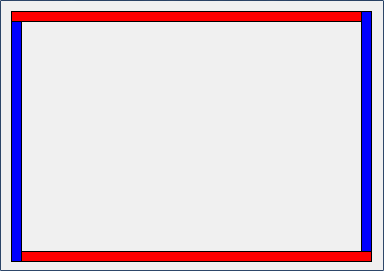
Create a new program called ramcek.py, in which you draw a frame like this using four narrow rectangles:
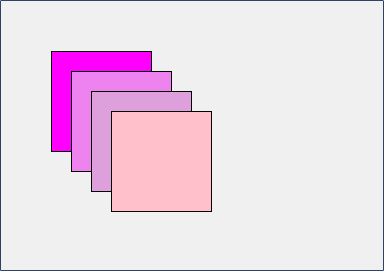
- The following image was created from four squares. The coordinates of the top-left corner of the first one are [50, 50]. Write a program called cez_seba.py that draws the image – choose any 4 colors (what colors does Python support? Can we specify them in another way than by name?).
-
Create a new program called 5_miesto_3.py, in which you modify the following code so that it draws the same image, but the program contains only 3 commands for drawing rectangles:
canvas.create_rectangle(90, 90, 150, 150, fill='yellow') canvas.create_rectangle(150, 90, 210, 150, fill='red') canvas.create_rectangle(90, 150, 150, 210, fill='green') canvas.create_rectangle(30, 90, 90, 150, fill='red') canvas.create_rectangle(90, 30, 150, 90, fill='green') -
Create a new program called pozicia_premennej.py and copy the following code into it.
The variables x and y contain the coordinates of the top-left corner of the square. Complete the program so that, using the given variables, it draws a square with a side length of 100:
    import tkinter
    canvas = tkinter.Canvas()
    canvas.pack()
    x = 100
    y = 70
    canvas.create_rectangle(x, y, x + , , fill='yellow')
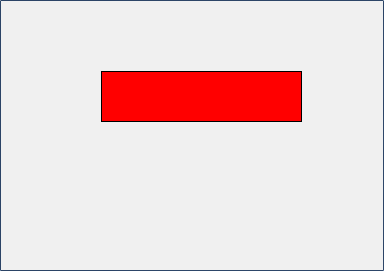
- Create a new program called obdlznik_premenne.py that uses four variables x, y, sirka, vyska and uses them to draw a rectangle whose top-left corner is at position x, y, with the given width and height. Choose the color yourself.
For example, when the program contains:
    x = 100
    y = 70
    sirka = 200
    vyska = 50
it should draw a rectangle like the one shown in the image.
- Create a program called lavy_roh.py that draws the following squares:
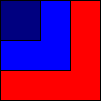
These squares have a common top-left corner, whose coordinates are x, y. The squares gradually become smaller: the red one has a side length of 100, the blue one 70, and the dark blue one 40. Use a for loop when drawing them.
- Create a program called vedla_seba.py that draws three touching rectangles:

The coordinates of the top-left corner of the first rectangle are stored in the variables x, y. All three rectangles have the same width and height, and these values are stored in the variables a, b.
Will the program work correctly if you increase the value of variable a by 20 and the value of variable y by 10? If not, fix the program.
- Let’s draw a square whose center has coordinates [x, y] and whose sides have a length of 100. The coordinates x, y are stored in the variables x, y. To draw such a square, we need to calculate the coordinates of the top-left and bottom-right corners:
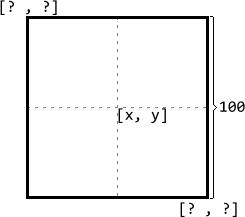
In a new program called stred_stvorca.py, write code that draws a green square with its center at [x, y] and a side length of 100.
- Create a program called tri_sustredne.py that draws three squares – all of them have the same center at point [x, y] and gradually become smaller (the red one has a side length of 100, the blue one 60, and the white one 20). Assume that the coordinates x, y are stored in the variables x, y.
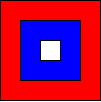
Will the program work correctly if you increase the value of variable x by 17 and the value of variable y by 29? If not, fix the program.
